4.10. Global Arrays and Topology
When writing an algorithm in Viskores by creating a worklet, the data each instance of the worklet has access to is intentionally limited. This allows Viskores to provide safety from race conditions and other parallel programming difficulties. However, there are times when the complexity of an algorithm requires all threads to have shared global access to a global structure. This chapter describes worklet tags that can be used to pass data globally to all instances of a worklet.
4.10.1. Whole Arrays
A whole array argument to a worklet allows you to pass in a viskores::cont::ArrayHandle.
All instances of the worklet will have access to all the data in the viskores::cont::ArrayHandle.
Common Errors
The Viskores worklet invoking mechanism performs many safety checks to prevent race conditions across concurrently running worklets. Using a whole array within a worklet circumvents this guarantee of safety, so be careful when using whole arrays, especially when writing to whole arrays.
A whole array is declared by adding a WholeArrayIn, a WholeArrayInOut, or a WholeArrayOut to the controlsignature of a worklet.
The corresponding argument to the viskores::cont::Invoker should be an viskores::cont::ArrayHandle.
The viskores::cont::ArrayHandle must already be allocated in all cases, including when using WholeArrayOut.
When the data are passed to the operator of the worklet, it is passed as an array portal object.
(Array portals are discussed in Section 3.2.4 (Array Portals).)
This means that the worklet can access any entry in the array with ArrayPortal::Get() and/or ArrayPortal::Set() methods.
We have already seen a demonstration of using a whole array in Example 4.43 in Chapter 4.3 (Worklet Types) to perform a simple array copy. Here we will construct a more thorough example of building functionality that requires random array access.
Let’s say we want to measure the quality of triangles in a mesh. A common method for doing this is using the equation
where \(a\) is the area of the triangle and \(h_1\), \(h_2\), and \(h_3\) are the lengths of the sides. We can easily compute this in a cell to point map, but what if we want to speed up the computations by reducing precision? After all, we probably only care if the triangle is good, reasonable, or bad. So instead, let’s build a lookup table and then retrieve the triangle quality from that lookup table based on its sides.
The following example demonstrates creating such a table lookup in an array and using a worklet argument tagged with WholeArrayIn to make it accessible.
  1namespace detail
  2{
  3
  4static const viskores::Id TRIANGLE_QUALITY_TABLE_DIMENSION = 8;
  5static const viskores::Id TRIANGLE_QUALITY_TABLE_SIZE =
  6  TRIANGLE_QUALITY_TABLE_DIMENSION * TRIANGLE_QUALITY_TABLE_DIMENSION;
  7
  8VISKORES_CONT
  9viskores::cont::ArrayHandle<viskores::Float32> GetTriangleQualityTable()
 10{
 11  // Use these precomputed values for the array. A real application would
 12  // probably use a larger array, but we are keeping it small for demonstration
 13  // purposes.
 14  static viskores::Float32 triangleQualityBuffer[TRIANGLE_QUALITY_TABLE_SIZE] = {
 15    0, 0,        0,        0,        0,        0,        0,        0,
 16    0, 0,        0,        0,        0,        0,        0,        0.24431f,
 17    0, 0,        0,        0,        0,        0,        0.43298f, 0.47059f,
 18    0, 0,        0,        0,        0,        0.54217f, 0.65923f, 0.66408f,
 19    0, 0,        0,        0,        0.57972f, 0.75425f, 0.82154f, 0.81536f,
 20    0, 0,        0,        0.54217f, 0.75425f, 0.87460f, 0.92567f, 0.92071f,
 21    0, 0,        0.43298f, 0.65923f, 0.82154f, 0.92567f, 0.97664f, 0.98100f,
 22    0, 0.24431f, 0.47059f, 0.66408f, 0.81536f, 0.92071f, 0.98100f, 1
 23  };
 24
 25  return viskores::cont::make_ArrayHandle(
 26    triangleQualityBuffer, TRIANGLE_QUALITY_TABLE_SIZE, viskores::CopyFlag::Off);
 27}
 28
 29template<typename T>
 30VISKORES_EXEC_CONT viskores::Vec<T, 3> TriangleEdgeLengths(
 31  const viskores::Vec<T, 3>& point1,
 32  const viskores::Vec<T, 3>& point2,
 33  const viskores::Vec<T, 3>& point3)
 34{
 35  return viskores::make_Vec(viskores::Magnitude(point1 - point2),
 36                            viskores::Magnitude(point2 - point3),
 37                            viskores::Magnitude(point3 - point1));
 38}
 39
 40VISKORES_SUPPRESS_EXEC_WARNINGS
 41template<typename PortalType, typename T>
 42VISKORES_EXEC_CONT static viskores::Float32 LookupTriangleQuality(
 43  const PortalType& triangleQualityPortal,
 44  const viskores::Vec<T, 3>& point1,
 45  const viskores::Vec<T, 3>& point2,
 46  const viskores::Vec<T, 3>& point3)
 47{
 48  viskores::Vec<T, 3> edgeLengths = TriangleEdgeLengths(point1, point2, point3);
 49
 50  // To reduce the size of the table, we just store the quality of triangles
 51  // with the longest edge of size 1. The table is 2D indexed by the length
 52  // of the other two edges. Thus, to use the table we have to identify the
 53  // longest edge and scale appropriately.
 54  T smallEdge1 = viskores::Min(edgeLengths[0], edgeLengths[1]);
 55  T tmpEdge = viskores::Max(edgeLengths[0], edgeLengths[1]);
 56  T smallEdge2 = viskores::Min(edgeLengths[2], tmpEdge);
 57  T largeEdge = viskores::Max(edgeLengths[2], tmpEdge);
 58
 59  smallEdge1 /= largeEdge;
 60  smallEdge2 /= largeEdge;
 61
 62  // Find index into array.
 63  viskores::Id index1 = static_cast<viskores::Id>(
 64    viskores::Floor(smallEdge1 * (TRIANGLE_QUALITY_TABLE_DIMENSION - 1) + 0.5));
 65  viskores::Id index2 = static_cast<viskores::Id>(
 66    viskores::Floor(smallEdge2 * (TRIANGLE_QUALITY_TABLE_DIMENSION - 1) + 0.5));
 67  viskores::Id totalIndex = index1 + index2 * TRIANGLE_QUALITY_TABLE_DIMENSION;
 68
 69  return triangleQualityPortal.Get(totalIndex);
 70}
 71
 72} // namespace detail
 73
 74struct TriangleQualityWorklet : viskores::worklet::WorkletVisitCellsWithPoints
 75{
 76  using ControlSignature = void(CellSetIn cells,
 77                                FieldInPoint pointCoordinates,
 78                                WholeArrayIn triangleQualityTable,
 79                                FieldOutCell triangleQuality);
 80  using ExecutionSignature = _4(CellShape, _2, _3);
 81  using InputDomain = _1;
 82
 83  template<typename CellShape,
 84           typename PointCoordinatesType,
 85           typename TriangleQualityTablePortalType>
 86  VISKORES_EXEC viskores::Float32 operator()(
 87    CellShape shape,
 88    const PointCoordinatesType& pointCoordinates,
 89    const TriangleQualityTablePortalType& triangleQualityTable) const
 90  {
 91    if (shape.Id != viskores::CELL_SHAPE_TRIANGLE)
 92    {
 93      this->RaiseError("Only triangles are supported for triangle quality.");
 94      return viskores::Nan32();
 95    }
 96    else
 97    {
 98      return detail::LookupTriangleQuality(triangleQualityTable,
 99                                           pointCoordinates[0],
100                                           pointCoordinates[1],
101                                           pointCoordinates[2]);
102    }
103  }
104};
105
106//
107// Later in the associated Filter class...
108//
109
110    viskores::cont::ArrayHandle<viskores::Float32> triangleQualityTable =
111      detail::GetTriangleQualityTable();
112
113    viskores::cont::ArrayHandle<viskores::Float32> triangleQualities;
114
115    this->Invoke(TriangleQualityWorklet{},
116                 inputDataSet.GetCellSet(),
117                 inputPointCoordinatesField,
118                 triangleQualityTable,
119                 triangleQualities);
4.10.2. Atomic Arrays
One of the problems with writing to whole arrays is that it is difficult to coordinate the access to an array from multiple threads. If multiple threads are going to write to a common index of an array, then you will probably need to use an atomic array.
An atomic array allows random access into an array of data, similar to a whole array. However, the operations on the values in the atomic array allow you to perform an operation that modifies its value that is guaranteed complete without being interrupted and potentially corrupted.
Common Errors
Due to limitations in available atomic operations, atomic arrays can currently only contain viskores::Int32 or viskores::Int64 values.
To use an array as an atomic array, first add the AtomicArrayInOut tag to the worklet’s ControlSignature.
The corresponding argument to the viskores::cont::Invoker should be an viskores::cont::ArrayHandle, which must already be allocated and initialized with values.
When the data are passed to the operator of the worklet, it is passed in a viskoresexec{AtomicArrayExecutionObject} structure.
-
template<typename T>
class AtomicArrayExecutionObject An object passed to a worklet when accessing an atomic array.
This object is created for the worklet when a
ControlSignatureargument isAtomicArrayInOut.AtomicArrayExecutionObjectbehaves similar to a normalArrayPortal. It has similarGet()andSet()methods, but it has additional features that allow atomic access as well as more methods for atomic operations.Public Functions
-
inline ValueType Get(viskores::Id index, viskores::MemoryOrder order = viskores::MemoryOrder::Acquire) const
Perform an atomic load of the indexed element with acquire memory ordering.
- Parameters:
index – The index of the element to load.
order – The memory ordering to use for the load operation.
- Returns:
The value of the atomic array at index.
-
inline ValueType Add(viskores::Id index, const ValueType &value, viskores::MemoryOrder order = viskores::MemoryOrder::SequentiallyConsistent) const
Peform an atomic addition with sequentially consistent memory ordering.
Warning
Overflow behavior from this operation is undefined.
- Parameters:
index – The index of the array element that will be added to.
value – The addend of the atomic add operation.
order – The memory ordering to use for the add operation.
- Returns:
The original value of the element at index (before addition).
-
inline void Set(viskores::Id index, const ValueType &value, viskores::MemoryOrder order = viskores::MemoryOrder::Release) const
Peform an atomic store to memory while enforcing, at minimum, “release” memory ordering.
Warning
Using something like:
Should not be done as it is not thread safe, instead you should use the provided Add method instead.Set(index, Get(index)+N)
- Parameters:
index – The index of the array element that will be added to.
value – The value to write for the atomic store operation.
order – The memory ordering to use for the store operation.
-
inline bool CompareExchange(viskores::Id index, ValueType *oldValue, const ValueType &newValue, viskores::MemoryOrder order = viskores::MemoryOrder::SequentiallyConsistent) const
Perform an atomic compare and exchange operation with sequentially consistent memory ordering.
This operation is typically used in a loop. For example usage, an atomic multiplication may be implemented using compare-exchange as follows:
AtomicArrayExecutionObject<viskores::Int32> atomicArray = ...; // Compare-exchange multiplication: viskores::Int32 current = atomicArray.Get(idx); // Load the current value at idx viskores::Int32 newVal; do { newVal = current * multFactor; // the actual multiplication } while (!atomicArray.CompareExchange(idx, ¤t, newVal));
The
whilecondition here updatesnewValwhat the proper multiplication is given the expected current value. It then compares this to the value in the array. If the values match, the operation was successful and the loop exits. If the values do not match, the value atidxwas changed by another thread since the initial Get, and the compare-exchange operation failed — the target element was not modified by the compare-exchange call. If this happens, the loop body re-executes using the new value ofcurrentand tries again until it succeeds.Note that for demonstration purposes, the previous code is unnecessarily verbose. We can express the same atomic operation more succinctly with just two lines where
newValis just computed in place.viskores::Int32 current = atomicArray.Get(idx); // Load the current value at idx while (!atomicArray.CompareExchange(idx, ¤t, current * multFactor));
- Parameters:
index – The index of the array element that will be atomically modified.
oldValue – A pointer to the expected value of the indexed element.
newValue – The value to replace the indexed element with.
order – The memory ordering to use for the compare and exchange operation.
- Returns:
If the operation is successful,
trueis returned. Otherwise,oldValueis replaced with the current value of the indexed element, the element is not modified, andfalseis returned. In either case,oldValuebecomes the value that was originally in the indexed element.
-
inline ValueType Get(viskores::Id index, viskores::MemoryOrder order = viskores::MemoryOrder::Acquire) const
Common Errors
Atomic arrays help resolve hazards in parallel algorithms, but they come at a cost. Atomic operations are more costly than non-thread-safe ones, and they can slow a parallel program immensely if used incorrectly.
The following example uses an atomic array to count the bins in a histogram. It does this by making the array of histogram bins an atomic array and then using an atomic add. Note that this is not the fastest way to create a histogram. We gave an implementation in Section 4.3.4 (Reduce by Key) that is generally faster (unless your histogram happens to be very sparse). Viskores also comes with a histogram worklet that uses a similar approach.
 1  struct CountBins : viskores::worklet::WorkletMapField
 2  {
 3    using ControlSignature = void(FieldIn data, AtomicArrayInOut histogramBins);
 4    using ExecutionSignature = void(_1, _2);
 5    using InputDomain = _1;
 6
 7    viskores::Range HistogramRange;
 8    viskores::Id NumberOfBins;
 9
10    VISKORES_CONT
11    CountBins(const viskores::Range& histogramRange, viskores::Id& numBins)
12      : HistogramRange(histogramRange)
13      , NumberOfBins(numBins)
14    {
15    }
16
17    template<typename T, typename AtomicArrayType>
18    VISKORES_EXEC void operator()(T value, const AtomicArrayType& histogramBins) const
19    {
20      viskores::Float64 interp =
21        (value - this->HistogramRange.Min) / this->HistogramRange.Length();
22      viskores::Id bin = static_cast<viskores::Id>(interp * this->NumberOfBins);
23      if (bin < 0)
24      {
25        bin = 0;
26      }
27      if (bin >= this->NumberOfBins)
28      {
29        bin = this->NumberOfBins - 1;
30      }
31
32      histogramBins.Add(bin, 1);
33    }
34  };
4.10.3. Whole Cell Sets
Section 4.3.2 (Topology Map) describes how to make a topology map filter that performs an operation on cell sets. The worklet has access to a single cell element (such as point or cell) and its immediate connections. But there are cases when you need more general queries on a topology. For example, you might need more detailed information than the topology map gives or you might need to trace connections from one cell to the next. To do this Viskores allows you to provide a whole cell set argument to a worklet that provides random access to the entire topology.
A whole cell set is declared by adding a WholeCellSetIn to the worklet’s ControlSignature.
The corresponding argument to the viskores::cont::Invoker should be a viskores::cont::CellSet subclass or an viskores::cont::UnknownCellSet (both of which are described in Section 2.4.2 (Cell Sets)).
The WholeCellSetIn is templated and takes two arguments: the “visit” topology type and the “incident” topology type, respectively.
These template arguments must be one of the topology element tags, but for convenience you can use Point and Cell in lieu of viskores::TopologyElementTagPoint and viskores::TopologyElementTagCell, respectively.
The “visit” and “incident” topology types define which topological elements can be queried (visited) and which incident elements are returned.
The semantics of the “visit” and “incident” topology is the same as that for the general topology maps described in Section 4.3.2 (Topology Map).
You can look up an element of the “visit” topology by index and then get all of the “incident” elements from it.
For example, a WholeCellSetIn<Cell, Point> allows you to find all the points that are incident on each cell (as well as querying the cell shape). Likewise, a WholeCellSetIn<Point, Cell> allows you to find all the cells that are incident on each point.
The default parameters of WholeCellSetIn are visiting cells with incident points.
That is, WholeCellSetIn<> is equivalent to WholeCellSetIn<Cell, Point>.
When the cell set is passed to the operator of the worklet, it is passed in a special connectivity object.
The actual object type depends on the cell set, but viskores::exec::ConnectivityExplicit and are two common examples viskores::exec::ConnectivityStructured.
-
template<typename ShapesPortalType, typename ConnectivityPortalType, typename OffsetsPortalType>
class ConnectivityExplicit A class holding information about topology connections.
An object of
ConnectivityExplicitis provided to a worklet when theControlSignatureargument isWholeCellSetInand theviskores::cont::CellSetprovided is aviskores::cont::CellSetExplicit.Public Types
-
using CellShapeTag = viskores::CellShapeTagGeneric
The tag representing the cell shape of the visited elements.
The tag type is allways
viskores::CellShapeTagGenericand its id is filled with the identifier for the appropriate shape.
-
using IndicesType = viskores::VecFromPortal<ConnectivityPortalType>
Type of variable that lists of incident indices will be put into.
Public Functions
-
inline SchedulingRangeType GetNumberOfElements() const
Provides the number of elements in the topology.
This number of elements is associated with the “visit” type of topology element, which is the first template argument to
WholeCellSetIn. The number of elements defines the valid indices for the other methods of this class.
-
inline CellShapeTag GetCellShape(viskores::Id index) const
Returns a tagfor the cell shape associated with the element at the given index.
The tag type is allways
viskores::CellShapeTagGenericand its id is filled with the identifier for the appropriate shape.
-
inline viskores::IdComponent GetNumberOfIndices(viskores::Id index) const
Given the index of a visited element, returns the number of incident elements touching it.
-
inline IndicesType GetIndices(viskores::Id index) const
Provides the indices of all elements incident to the visit element of the provided index.
Returns a Vec-like object containing the indices for the given index. The object returned is not an actual array, but rather an object that loads the indices lazily out of the connectivity array. This prevents us from having to know the number of indices at compile time.
-
using CellShapeTag = viskores::CellShapeTagGeneric
-
template<typename VisitTopology, typename IncidentTopology, viskores::IdComponent Dimension>
class ConnectivityStructured A class holding information about topology connections.
An object of
ConnectivityStructuredis provided to a worklet when theControlSignatureargument isWholeCellSetInand theviskores::cont::CellSetprovided is aviskores::cont::CellSetStructured.Public Types
-
using CellShapeTag = typename Helper::CellShapeTag
The tag representing the cell shape of the visited elements.
If the “visit” element is cells, then the returned tag is
viskores::CellShapeTagHexahedronfor a 3D structured grid,viskores::CellShapeTagQuadfor a 2D structured grid, orviskores::CellShapeLinefor a 1D structured grid.
-
using IndicesType = typename Helper::IndicesType
Type of variable that lists of incident indices will be put into.
Public Functions
-
inline viskores::Id GetNumberOfElements() const
Provides the number of elements in the topology.
This number of elements is associated with the “visit” type of topology element, which is the first template argument to
WholeCellSetIn. The number of elements defines the valid indices for the other methods of this class.
-
inline CellShapeTag GetCellShape(viskores::Id) const
Returns a tag for the cell shape associated with the element at the given index.
If the “visit” element is cells, then the returned tag is
viskores::CellShapeTagHexahedronfor a 3D structured grid,viskores::CellShapeTagQuadfor a 2D structured grid, orviskores::CellShapeLinefor a 1D structured grid.
-
template<typename IndexType>
inline viskores::IdComponent GetNumberOfIndices(const IndexType &index) const Given the index of a visited element, returns the number of incident elements touching it.
-
template<typename IndexType>
inline IndicesType GetIndices(const IndexType &index) const Provides the indices of all elements incident to the visit element of the provided index.
-
inline SchedulingRangeType FlatToLogicalVisitIndex(viskores::Id flatVisitIndex) const
Convenience method that converts a flat, 1D index to the visited elements to a
viskores::Veccontaining the logical indices in the grid.
-
inline SchedulingRangeType FlatToLogicalIncidentIndex(viskores::Id flatIncidentIndex) const
Convenience method that converts a flat, 1D index to the incident elements to a
viskores::Veccontaining the logical indices in the grid.
-
inline viskores::Id LogicalToFlatVisitIndex(const SchedulingRangeType &logicalVisitIndex) const
Convenience method that converts logical indices in a
viskores::Vecof a visited element to a flat, 1D index.
-
inline viskores::Id LogicalToFlatIncidentIndex(const SchedulingRangeType &logicalIncidentIndex) const
Convenience method that converts logical indices in a
viskores::Vecof an incident element to a flat, 1D index.
-
using CellShapeTag = typename Helper::CellShapeTag
All these connectivity objects share a common interface.
In particular, the share the types CellShapeTag and IndicesType.
They also share the methods GetNumberOfElements(), GetCellShape(), GetNumberOfIndices(), and GetIndices().
Viskores comes with several functions to work with the shape and index information returned from these connectivity objects. Most of these methods are documented in Chapter 4.7 (Working with Cells).
Let us use the whole cell set feature to help us determine the “flatness” of a polygonal mesh. We will do this by summing up all the angles incident on each on each point. That is, for each point, we will find each incident polygon, then find the part of that polygon using the given point, then computing the angle at that point, and then summing for all such angles. So, for example, in the mesh fragment shown in Figure 4.4 one of the angles attached to the middle point is labeled \(\theta_{j}\).
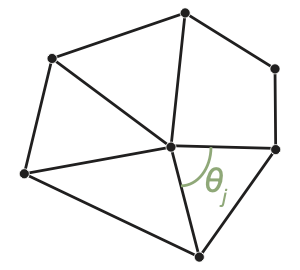
Figure 4.4 The angles incident around a point in a mesh.
We want a worklet to compute \(\sum_{j} \theta\) for all such attached angles. This measure is related (but not the same as) the curvature of the surface. A flat surface will have a sum of \(2\pi\). Convex and concave surfaces have a value less than \(2\pi\), and saddle surfaces have a value greater than \(2\pi\).
To do this, we create a visit points with cells worklet (Section 4.3.2.2 (Visit Points with Cells)) that visits every point and gives the index of every incident cell. The worklet then uses a whole cell set to inspect each incident cell to measure the attached angle and sum them together.
  1struct SumOfAngles : viskores::worklet::WorkletVisitPointsWithCells
  2{
  3  using ControlSignature = void(CellSetIn inputCells,
  4                                WholeCellSetIn<>, // Same as inputCells
  5                                WholeArrayIn pointCoords,
  6                                FieldOutPoint angleSum);
  7  using ExecutionSignature = void(CellIndices incidentCells,
  8                                  InputIndex pointIndex,
  9                                  _2 cellSet,
 10                                  _3 pointCoordsPortal,
 11                                  _4 outSum);
 12  using InputDomain = _1;
 13
 14  template<typename IncidentCellVecType,
 15           typename CellSetType,
 16           typename PointCoordsPortalType,
 17           typename SumType>
 18  VISKORES_EXEC void operator()(const IncidentCellVecType& incidentCells,
 19                                viskores::Id pointIndex,
 20                                const CellSetType& cellSet,
 21                                const PointCoordsPortalType& pointCoordsPortal,
 22                                SumType& outSum) const
 23  {
 24    using CoordType = typename PointCoordsPortalType::ValueType;
 25
 26    CoordType thisPoint = pointCoordsPortal.Get(pointIndex);
 27
 28    outSum = 0;
 29    for (viskores::IdComponent incidentCellIndex = 0;
 30         incidentCellIndex < incidentCells.GetNumberOfComponents();
 31         ++incidentCellIndex)
 32    {
 33      // Get information about incident cell.
 34      viskores::Id cellIndex = incidentCells[incidentCellIndex];
 35      typename CellSetType::CellShapeTag cellShape = cellSet.GetCellShape(cellIndex);
 36      typename CellSetType::IndicesType cellConnections = cellSet.GetIndices(cellIndex);
 37      viskores::IdComponent numPointsInCell = cellSet.GetNumberOfIndices(cellIndex);
 38      viskores::IdComponent numEdges;
 39      viskores::exec::CellEdgeNumberOfEdges(numPointsInCell, cellShape, numEdges);
 40
 41      // Iterate over all edges and find the first one with pointIndex.
 42      // Use that to find the first vector.
 43      viskores::IdComponent edgeIndex = -1;
 44      CoordType vec1;
 45      while (true)
 46      {
 47        ++edgeIndex;
 48        if (edgeIndex >= numEdges)
 49        {
 50          this->RaiseError("Bad cell. Could not find two incident edges.");
 51          return;
 52        }
 53        viskores::IdComponent2 edge;
 54        viskores::exec::CellEdgeLocalIndex(
 55          numPointsInCell, 0, edgeIndex, cellShape, edge[0]);
 56        viskores::exec::CellEdgeLocalIndex(
 57          numPointsInCell, 1, edgeIndex, cellShape, edge[1]);
 58        if (cellConnections[edge[0]] == pointIndex)
 59        {
 60          vec1 = pointCoordsPortal.Get(cellConnections[edge[1]]) - thisPoint;
 61          break;
 62        }
 63        else if (cellConnections[edge[1]] == pointIndex)
 64        {
 65          vec1 = pointCoordsPortal.Get(cellConnections[edge[0]]) - thisPoint;
 66          break;
 67        }
 68        else
 69        {
 70          // Continue to next iteration of loop.
 71        }
 72      }
 73
 74      // Continue iteration over remaining edges and find the second one with
 75      // pointIndex. Use that to find the second vector.
 76      CoordType vec2;
 77      while (true)
 78      {
 79        ++edgeIndex;
 80        if (edgeIndex >= numEdges)
 81        {
 82          this->RaiseError("Bad cell. Could not find two incident edges.");
 83          return;
 84        }
 85        viskores::IdComponent2 edge;
 86        viskores::exec::CellEdgeLocalIndex(
 87          numPointsInCell, 0, edgeIndex, cellShape, edge[0]);
 88        viskores::exec::CellEdgeLocalIndex(
 89          numPointsInCell, 1, edgeIndex, cellShape, edge[1]);
 90        if (cellConnections[edge[0]] == pointIndex)
 91        {
 92          vec2 = pointCoordsPortal.Get(cellConnections[edge[1]]) - thisPoint;
 93          break;
 94        }
 95        else if (cellConnections[edge[1]] == pointIndex)
 96        {
 97          vec2 = pointCoordsPortal.Get(cellConnections[edge[0]]) - thisPoint;
 98          break;
 99        }
100        else
101        {
102          // Continue to next iteration of loop.
103        }
104      }
105
106      // The dot product of two unit vectors is equal to the cosine of the
107      // angle between them.
108      viskores::Normalize(vec1);
109      viskores::Normalize(vec2);
110      SumType cosine = static_cast<SumType>(viskores::Dot(vec1, vec2));
111
112      outSum += viskores::ACos(cosine);
113    }
114  }
115};