1.2. Building and Installing Viskores
Before we begin describing how to develop with Viskores, we have a brief overview of how to build Viskores, optionally install it on your system, and start your own programs that use Viskores.
1.2.1. Getting Viskores
Viskores is an open source software product where the code is made freely available. To get the latest released version of Viskores, go to the Viskores releases page:
From there with your favorite browser you may download the source code from any of the recent Viskores releases in a variety of different archive files such as zip or tar gzip.
For access to the most recent work, the Viskores development team provides public anonymous read access to their main source code repository. The main Viskores repository on a GitLab instance hosted at Kitware, Inc. The repository can be browsed from its project web page:
We leave access to the git hosted repository as an exercise for the user. Those interested in git access for the purpose of contributing to Viskores should consult the CONTRIBUTING guidelines documented in the source code.
1.2.2. Configuring Viskores
Viskores uses a cross-platform configuration tool named CMake to simplify the configuration and building across many supported platforms. CMake is available from many package distribution systems and can also be downloaded for many platforms from http://cmake.org.
Most distributions of CMake come with a convenient GUI application (cmake-gui) that allows you to browse all of the available configuration variables and run the configuration. Many distributions also come with an alternative terminal-based version (ccmake), which is helpful when accessing remote systems where creating GUI windows is difficult.
One helpful feature of CMake is that it allows you to establish a build directory separate from the source directory, and the Viskores project requires that separation. Thus, when you run CMake for the first time, you want to set the build directory to a new empty directory and the source to the downloaded or cloned files. The following example shows the steps for the case where the Viskores source is cloned from the git repository. (If you extracted files from an archive downloaded from the Viskores web page, the instructions are the same from the second line down.)
tar xvzf ~/Downloads/viskores-v2.1.0.tar.gz
mkdir viskores-build
cd viskores-build
cmake-gui ../viskores-v2.1.0
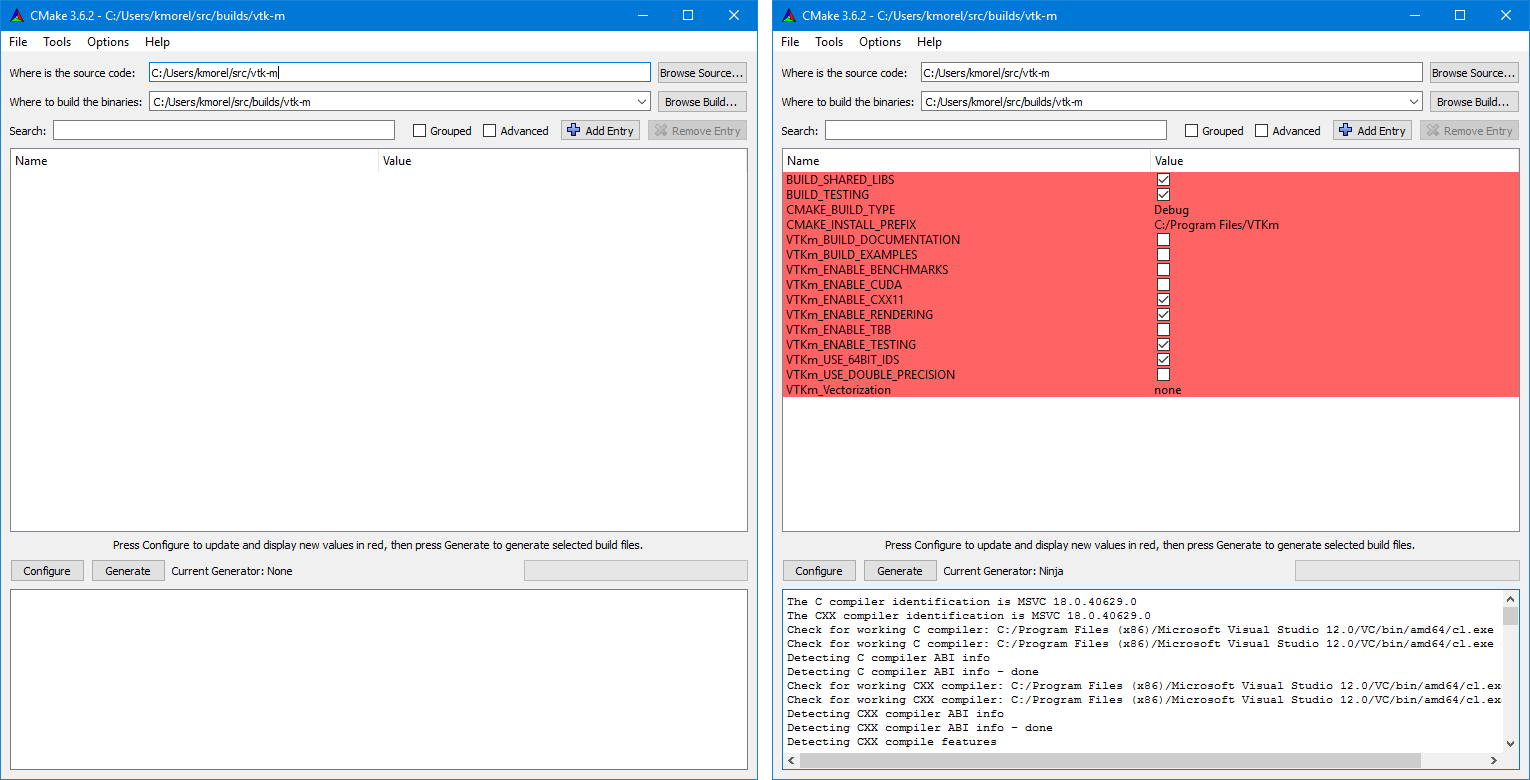
Figure 1.1 The CMake GUI configuring the Viskores project. At left is the initial blank configuration. At right is the state after a configure pass.
The first time the CMake GUI runs, it initially comes up blank as shown at left in Figure 1.1. Verify that the source and build directories are correct (located at the top of the GUI) and then click the Configure button near the bottom. The first time you run configure, CMake brings up a dialog box asking what generator you want for the project. This allows you to select what build system or IDE to use (e.g. make, ninja, Visual Studio). Once you click Finish, CMake will perform its first configuration. Don’t worry if CMake gives an error about an error in this first configuration process.
Common Errors
Most options in CMake can be reconfigured at any time, but not the compiler and build system used. These must be set the first time configure is run and cannot be subsequently changed. If you want to change the compiler or the project file types, you will need to delete everything in the build directory and start over.
After the first configuration, the CMake GUI will provide several configuration options as shown in Figure 1.1 on the right. You now have a chance to modify the configuration of Viskores, which allows you to modify both the behavior of the compiled Viskores code as well as find components on your system. Using the CMake GUI is usually an iterative process where you set configuration options and re-run Configure. Each time you configure, CMake might find new options, which are shown in red in the GUI.
It is often the case during this iterative configuration process that configuration errors occur. This can occur after a new option is enabled but CMake does not automatically find the necessary libraries to make that feature possible. For example, to enable TBB support, you may have to first enable building TBB, configure for TBB support, and then tell CMake where the TBB include directories and libraries are.
Once you have set all desired configuration variables and resolved any CMake errors, click the Generate button. This will create the build files (such as makefiles or project files depending on the generator chosen at the beginning). You can then close the CMake GUI.
There are a great number of configuration parameters available when running CMake on Viskores. The following list contains the most common configuration parameters.
- BUILD_SHARED_LIBS
Determines whether static or shared libraries are built.
- CMAKE_BUILD_TYPE
Selects groups of compiler options from categories like Debug and Release. Debug builds are, obviously, easier to debug, but they run much slower than Release builds. Use Release builds whenever releasing production software or doing performance tests.
- CMAKE_INSTALL_PREFIX
The root directory to place files when building the install target.
- Viskores_ENABLE_EXAMPLES
The Viskores repository comes with an textfilename{examples} directory. This macro determines whether they are built.
- Viskores_ENABLE_BENCHMARKS
If on, the Viskores build includes several benchmark programs. The benchmarks are regression tests for performance.
- Viskores_ENABLE_CUDA
Determines whether Viskores is built to run on CUDA GPU devices.
- Viskores_ENABLE_KOKKOS
Determines whether Viskores is built using the Kokkos portable library. Kokkos, can be configured to support several backends that Viskores can leverage.
- Viskores_ENABLE_MPI
Determines whether Viskores is built with MPI suppoert for running on distributed memory clusters.
- Viskores_ENABLE_OPENMP
Determines whether Viskores is built to run on multi-core devices using OpenMP pragmas provided by the C++ compiler.
- Viskores_ENABLE_RENDERING
Determines whether to build the rendering library.
- Viskores_ENABLE_TBB
Determines whether Viskores is built to run on multi-core x86 devices using the Intel Threading Building Blocks library.
- Viskores_ENABLE_TESTING
If on, the Viskores build includes building many test programs. The Viskores source includes hundreds of regression tests to ensure quality during development.
- Viskores_ENABLE_TUTORIALS
If on, several small example programes used for the Viskores tutorial are built.
- Viskores_USE_64BIT_IDS
If on, then Viskores will be compiled to use 64-bit integers to index arrays and other lists. If off, then Viskores will use 32-bit integers. 32-bit integers take less memory but could cause failures on larger data.
- Viskores_USE_DOUBLE_PRECISION
If on, then Viskores will use double precision (64-bit) floating point numbers for calculations where the precision type is not otherwise specified. If off, then single precision (32-bit) floating point numbers are used. Regardless of this setting, Viskores’s templates will accept either type.
1.2.3. Building Viskores
Once CMake successfully configures Viskores and generates the files for the build system, you are ready to build Viskores. As stated earlier, CMake supports generating configuration files for several different types of build tools. Make and ninja are common build tools, but CMake also supports building project files for several different types of integrated development environments such as Microsoft Visual Studio and Apple XCode.
The Viskores libraries and test files are compiled when the default build is invoked.
For example, if a Makefile was generated, the build is invoked by calling textfilename{make} in the build directory.
Expanding on Example 1.1
tar xvzf ~/Downloads/viskores-v2.1.0.tar.gz
mkdir viskores-build
cd viskores-build
cmake-gui ../viskores-v2.1.0
make -j
make install
Did You Know?
Makefile and other project files generated by CMake support parallel builds, which run multiple compile steps simultaneously.
On computers that have multiple processing cores (as do almost all modern computers), this can significantly speed up the overall compile.
Some build systems require a special flag to engage parallel compiles.
For example, make requires the -j flag to start parallel builds as demonstrated in Example 1.2.
Did You Know?
Example 1.2 assumes that a make build system was generated, which is the default on most system.
However, CMake supports many more build systems, which use different commands to run the build.
If you are not sure what the appropriate build command is, you can run cmake --build to allow CMake to start the build using whatever build system is being used.
Common Errors
CMake allows you to switch between several types of builds including default, Debug, and Release.
Programs and libraries compiled as release builds can run much faster than those from other types of builds.
Thus, it is important to perform Release builds of all software released for production or where runtime is a concern.
Some integrated development environments such as Microsoft Visual Studio allow you to specify the different build types within the build system.
But for other build programs, like make, you have to specify the build type in the CMAKE_BUILD_TYPE CMake configuration variable, which is described in Section 1.2.2 (Configuring Viskores).
CMake creates several build “targets” that specify the group of things to build.
The default target builds all of Viskores’s libraries as well as tests, examples, and benchmarks if enabled.
The test target executes each of the Viskores regression tests and verifies they complete successfully on the system.
The install target copies the subset of files required to use Viskores to a common installation directory.
The install target may need to be run as an administrator user if the installation directory is a system directory.
Did You Know?
Viskores contains a significant amount of regression tests. If you are not concerned with testing a build on a given system, you can turn off building the testing, benchmarks, and examples using the CMake configuration variables described in Section 1.2.2 (Configuring Viskores). This can shorten the Viskores compile time.
1.2.4. Linking to Viskores
Ultimately, the value of Viskores is the ability to link it into external projects that you write. The header files and libraries installed with Viskores are typical, and thus you can link Viskores into a software project using any type of build system. However, Viskores comes with several CMake configuration files that simplify linking Viskores into another project that is also managed by CMake. Thus, the documentation in this section is specifically for finding and configuring Viskores for CMake projects.
Viskores can be configured from an external project using the find_package() CMake function.
The behavior and use of this function is well described in the CMake documentation.
The first argument to find_package() is the name of the package, which in this case is Viskores.
CMake configures this package by looking for a file named ViskoresConfig.cmake, which will be located in the lib/cmake/viskores-<Viskores version> directory of the install or build of Viskores.
The configurable CMake variable CMAKE_PREFIX_PATH can be set to the build or install directory, the CMAKE_PREFIX_PATH environment variable can likewise be set, or cmakevar{Viskores_DIR} can be set to the directory that contains this file.
find_package(Viskores REQUIRED)
Did You Know?
The CMake find_package() function also supports several features not discussed here including specifying a minimum or exact version of Viskores and turning off some of the status messages.
See the CMake documentation for more details.
When you load the Viskores package in CMake, several libraries are defined.
Projects building with Viskores components should link against one or more of these libraries as appropriate, typically with the target_link_libraries() command.
find_package(Viskores REQUIRED)

add_executable(myprog myprog.cxx)
target_link_libraries(myprog viskores::filter)
Several library targets are provided, but most projects will need to link in one or more of the following.
- viskores::cont
Contains the base objects used to control Viskores.
- viskores::filter
Contains Viskores’s pre-built filters. Applications that are looking to use Viskores filters will need to link to this library. The filters are further broken up into several smaller library packages (such as
viskores::filter_contour, :cmake:variable`viskores::filter_flow`,viskores::filter_field_transform, and many more.viskores::filteris actually a meta library that links all of these filter libraries to a CMake target.
- viskores::io
Contains Viskores’s facilities for interacting with files. For example, reading and writing png, NetBPM, and VTK files.
- viskores::rendering
Contains Viskores’s rendering components. This library is only available if
Viskores_ENABLE_RENDERINGis set to true.
- viskores::source
Contains Viskores’s pre-built dataset generators suchas Wavelet, Tangle, and Oscillator. Most applications will not need to link to this library.
Did You Know?
The “libraries” made available in the Viskores do more than add a library to the linker line. These libraries are actually defined as external targets that establish several compiler flags, like include file directories. Many CMake packages require you to set up other target options to compile correctly, but for Viskores it is sufficient to simply link against the library.
Common Errors
Because the Viskores CMake libraries do more than set the link line, correcting the link libraries can do more than fix link problems. For example, if you are getting compile errors about not finding Viskores header files, then you probably need to link to one of Viskores’s libraries to fix the problem rather than try to add the include directories yourself.
The following is a list of all the CMake variables defined when the textcode{find_package} function completes.
- Viskores_FOUND
Set to true if the Viskores CMake package is successfully loaded. If
find_package()was not called with theREQUIREDoption, then this variable should be checked before attempting to use Viskores.
- Viskores_VERSION
The version number of the loaded Viskores package. This is in the form “major.minor”.
- Viskores_VERSION_FULL
The extended version number of the Viskores package including patch and in-between-release information. This is in the form “major.minor.patch[.gitsha1]” where “gitsha” is only included if the source code is in between releases.
- Viskores_VERSION_MAJOR
The major Viskores version number.
- Viskores_VERSION_MINOR
The minor Viskores version number.
- Viskores_VERSION_PATCH
The patch Viskores version number.
- Viskores_ENABLE_CUDA
Set to true if Viskores was compiled for CUDA.
- Viskores_ENABLE_Kokkos
Set to true if Viskores was compiled with Kokkos.
- Viskores_ENABLE_OPENMP
Set to true if Viskores was compiled for OpenMP.
- Viskores_ENABLE_TBB
Set to true if Viskores was compiled for TBB.
- Viskores_ENABLE_RENDERING
Set to true if the Viskores rendering library was compiled.
- Viskores_ENABLE_MPI
Set to true if Viskores was compiled with MPI support.
These package variables can be used to query whether optional components are supported before they are used in your CMake configuration.
find_package(Viskores REQUIRED)

if (NOT Viskores::ENABLE::RENDERING)
  message(FATAL_ERROR "Viskores must be built with rendering on.")
endif()

add_executable(myprog myprog.cxx)
target_link_libraries(myprog viskores::cont viskores::rendering)